WhatsApp QR Code vs WhatsApp Business API: Which Should You Use?
Short answer: use a WhatsApp QR connection if you want your chatbot live in minutes and you mostly reply to customers who message you first. Use the official WhatsApp Business API if you send broadcasts, expect high volume, or cannot risk losing your number. BossReply supports both, so you can start with one and move to the other.
Last updated: October 16, 2026. Written by the BossReply Team.
Key takeaways
QR login is the fastest way to connect, but it is an unofficial link, so the risk of your number being restricted is higher.
The official WhatsApp Business API is Meta's approved channel for automation. It is built for scale, broadcasts and team inboxes.
Start with QR to test an AI chatbot on a small number of chats. Use the API for volume, campaigns and anything business-critical.
Whichever you choose, keep messages relevant, wanted and easy to opt out of.
What is a WhatsApp chatbot?
A WhatsApp chatbot is software that answers messages on WhatsApp automatically. A rules-based bot follows buttons and fixed flows. An AI chatbot reads the customer's question and replies in natural language, using your own content, such as FAQs, product details and policies, as its source of truth.
For most small businesses the goal is simple: reply in seconds, 24/7, answer the common questions, collect lead details, and hand the conversation to a person when it matters. How you connect the chatbot to WhatsApp, with a QR code or the official API, decides how fast you can start and how safe your number is.
How does a WhatsApp chatbot connect to WhatsApp?
There are two ways. With a QR connection you scan a code, the same way you link WhatsApp Web, and the chatbot works with your existing number. With the WhatsApp Business API your number is registered with Meta's official business platform through a provider, and the chatbot talks to WhatsApp through that approved channel.
Both routes let a chatbot reply to customers who write to you. The differences show up in setup time, limits, the rules for starting conversations, and the risk to your number.
What is the WhatsApp QR connection?
A QR connection links your existing WhatsApp account to your chatbot or inbox by scanning a code. It takes minutes, keeps your current number, and does not require message templates to be approved before you write to someone.
Advantages of the QR connection
You can be live in minutes, with no business verification.
It works with the number your customers already know.
It is flexible: you are not limited to pre-approved templates.
Drawbacks of the QR connection
It is unofficial: it links to your account rather than going through Meta's approved business channel.
There is a higher risk of your number being restricted, especially with bulk or repetitive messages.
It is not designed for large broadcast campaigns or heavy volume.
What is the official WhatsApp Business API?
The WhatsApp Business API is Meta's official route for businesses that want to automate WhatsApp at scale. It is built for chatbots, shared team inboxes and broadcast campaigns. Setup takes longer, because the number goes through registration and business verification, and messages that you start yourself generally have to use pre-approved templates. In return you get a channel designed for volume and a much lower risk to your number.
Advantages of the official API
It is the approved channel, so the risk to your number is much lower.
It is built for broadcasts, larger volumes and several team members.
It is the better long-term base for a business that depends on WhatsApp.
Drawbacks of the official API
Setup takes longer because of verification and template approval.
Messages you start generally need pre-approved templates.
Meta's messaging charges can apply on top of your provider's fee.
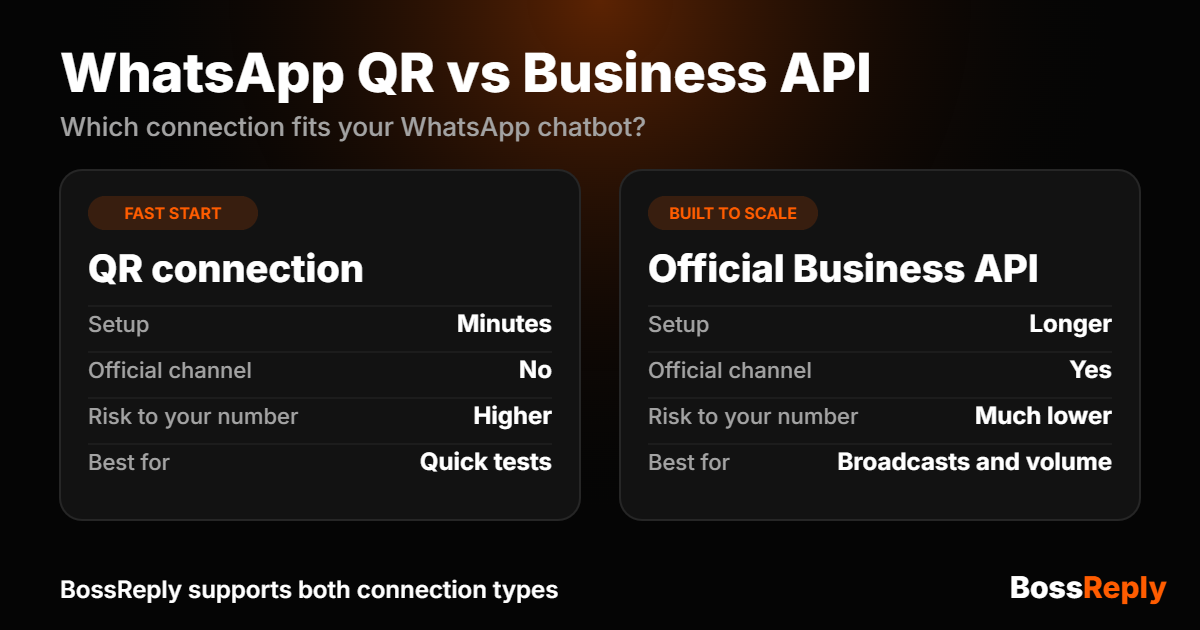
WhatsApp QR vs WhatsApp Business API: comparison table
Feature | QR connection | Official Business API |
|---|---|---|
Setup time | Minutes | Longer (verification and templates) |
Official channel | No, unofficial link | Yes, Meta's approved route |
Risk to your number | Higher | Much lower |
Starting conversations | Flexible | Pre-approved templates |
Broadcast campaigns | Not recommended | Built for it |
Best volume | Small | Medium to large |
Best for | Quick tests and replies | Scale and long-term use |
Is the WhatsApp QR connection safe?
It works, but it is less safe than the official API. Because QR-based tools are unofficial, WhatsApp can restrict a number that behaves like an automated sender, for example by messaging many people at once or sending the same message repeatedly. Vendors that sell the official API often stress this risk, so treat the exact odds with caution. The direction is still clear: the more you automate and broadcast, the stronger the case for the official API.
If your WhatsApp number is how customers find and pay you, do not run it through an unofficial connection.
Which should you choose: QR or API?
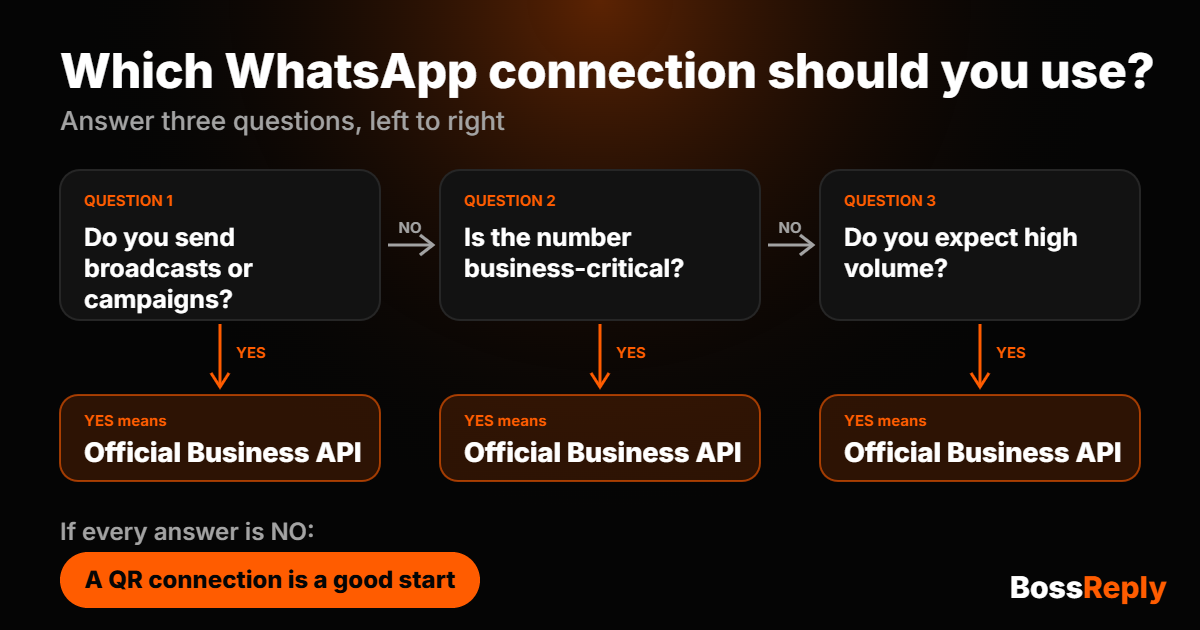
Choose by volume, risk and whether you send broadcasts. Use the two lists below, then check the decision chart.
Choose the QR connection if…
You are testing an AI chatbot on a small number of chats.
You mostly reply to customers who message you first.
You want to be live today.
Losing the number would be inconvenient, not damaging.
Choose the official API if…
You send broadcasts or campaigns.
You expect high or growing volume.
The number is business-critical and you cannot risk losing it.
Several team members need to handle conversations.
How much does each option cost?
Costs depend on your provider and on Meta's current pricing, which changes from time to time. In general, a QR connection avoids Meta's per-conversation fees, while the official API involves Meta's messaging charges plus your provider's fee. Check Meta's current pricing page before you decide. BossReply supports both connection types, and its plans start at $14 per month. See the pricing page for what each plan includes.
What can an AI WhatsApp chatbot do for your business?
A good AI chatbot does more than send canned replies. With BossReply you can:
Answer questions 24/7 from your own content, docs and FAQs, using the knowledge base.
Qualify leads and handle common objections before a person steps in.
Hand over to your team from a shared inbox when a human is needed.
Send broadcasts with the WhatsApp broadcast feature, which suits the official API.
Keep every channel together: Instagram, Messenger, Telegram and website chat live in the same inbox.
Choose your AI model: pick from OpenAI, Claude, Gemini, Grok and more, and bring your own API key to pay your AI provider directly.
How do you avoid problems on WhatsApp?
Most restrictions come from behavior, not from the connection type. Follow these habits on either option:
Message people who expect to hear from you, and who have asked for the information.
Do not send the same message to large lists in a short time, especially on a QR connection.
Keep replies relevant and personal, and make it easy to opt out.
Keep a human in the loop so your team can take over from the AI when it matters.
Warm up gradually instead of switching on high volume overnight.
Review Meta's current WhatsApp policies from time to time, because they change.
How do you connect WhatsApp to an AI chatbot with BossReply?
Create your BossReply account. Most setups take under 10 minutes to launch.
Connect WhatsApp. Use a quick QR login to start, or the official WhatsApp Business API for large-scale automation and broadcasts.
Add your business content to the knowledge base so the AI can answer from it.
Pick your AI model and write the instructions that set its tone and rules.
Turn on the agent and invite your team, so every conversation lands in one inbox.
You can see how it works on the WhatsApp chatbot page. If you also want to turn Instagram comments into DMs, read about Instagram comment-to-DM automation, or compare tools on the ManyChat alternative page.
Frequently asked questions
What is the difference between WhatsApp QR and the WhatsApp Business API?
A QR connection links your existing WhatsApp account by scanning a code and is live in minutes, but it is unofficial and carries a higher risk to your number. The WhatsApp Business API is Meta's official channel, built for scale and broadcasts, and it takes longer to set up.
Can I get banned for using a QR connection?
QR connections are unofficial, so there is a higher risk of restrictions than with the official API, mainly when you send bulk or repetitive messages. If your number is critical to your business, choose the API.
Is the WhatsApp Business API better than the QR connection?
For scale, broadcasts and number safety, yes. For a quick test or a small number of replies, a QR connection is faster and simpler. The better option depends on your volume and how much your number matters.
Do I need message templates on WhatsApp?
On the official API, messages that you start generally need pre-approved templates, while replies to customers who write first are handled more flexibly. A QR connection does not use approved templates.
Can I use an AI chatbot on WhatsApp?
Yes. An AI chatbot can answer customer questions on WhatsApp using your own content, qualify leads and hand over to a person. BossReply connects with either a QR login or the official API.
Can I move from QR to the API later?
Yes. You can connect with the official API when you are ready to scale, and BossReply supports both connection types.
Which AI models can I use for my WhatsApp chatbot?
With BossReply you can choose the AI model that suits your business, including OpenAI, Claude, Gemini and Grok, and you can bring your own API key to pay your AI provider directly.
Do the WhatsApp rules ever change?
Yes. WhatsApp updates its policies and pricing from time to time, so check Meta's current documentation before you decide.
Conclusion
If you need to be live today and mostly answer people who message you, start with a QR connection. If WhatsApp is central to your sales, if you send broadcasts, or if you expect volume, use the official WhatsApp Business API. You do not have to commit forever: BossReply supports both, so you can test on QR and move to the API as you grow.
Ready to try it? Get started with BossReply and put an AI chatbot on your WhatsApp.