Best WhatsApp Chatbots for Small Business Under $50 (2026)
Short answer: for a small business with a budget under $50 per month, the best WhatsApp chatbot options are BossReply (from $14, with QR or official API), Chatfuel (reported at $20 with AI credit), Kommo (from $25 per user), Tidio (from $24.17, website chat plus WhatsApp), and Superchat's free plan for very small volumes. Remember that Meta's WhatsApp fees are charged separately from every subscription, so the platform price is only part of your bill.
Last updated: October 17, 2026. Written by the BossReply Team. BossReply is our product and is listed first; we label third-party data and mark what we could not verify.
Key takeaways
"Under $50" should cover the subscription and a realistic estimate of Meta's per-message fees, not the subscription alone.
Very few tools publish a clear price under $50 that includes the official WhatsApp API plus a chatbot. Check what each plan includes.
Per-user pricing (Kommo) gets expensive as a team grows, per-contact pricing (ManyChat, respond.io) grows with your audience, and flat pricing (BossReply) grows with features.
Meta announced per-message billing for template messages from July 2025. Vendors say service replies may become billable from October 1, 2026, which Meta's page did not confirm when we read it.
What does a small business really pay for WhatsApp?
Three costs add up. First is the chatbot or inbox subscription. Second is Meta's per-message fee for template messages on the official Business Platform: marketing templates are always charged, utility templates are charged outside an open service window, and authentication templates are charged, with rates that depend on the recipient's country. Third is any provider markup, such as Zoko's own per-conversation fee or WATI's rate card. Replies you send inside the 24-hour customer service window were free on Meta's page when we read it, but WATI, Gupshup and Zoho have published notices saying service messages become billable from October 1, 2026, with 1,000 free per month per number. Check Meta's pricing page before you plan.
Best WhatsApp chatbots under $50 at a glance
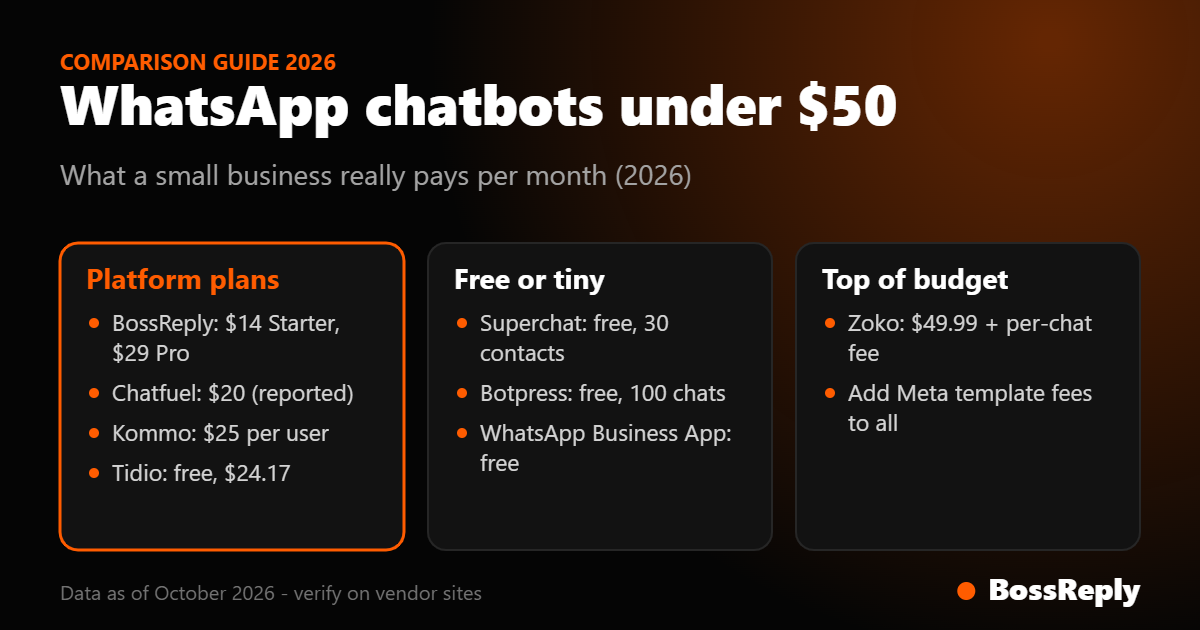
Tool | Plan price | What you get | Watch out for |
|---|---|---|---|
BossReply | Starter $14, Pro $29 | AI agent, shared inbox, QR or official API, Instagram and web chat | Meta fees on the official API; Starter has 500 bot conversations |
Chatfuel | $20 (reported) | Unlimited contacts, $20 AI credit | Bot pauses when credit ends unless you add your own key |
Kommo | $25 per user | CRM with official WhatsApp API | 6-month minimum, per-user cost |
Tidio | Free, $24.17 | Website chat with WhatsApp, Messenger and Instagram | Lyro AI is an add-on from $32.50 |
Superchat | Free | 1 account, 30 active contacts | 12-month term on paid plans |
Zoko | From $49.99 | WhatsApp commerce for Shopify | Per-conversation fee on top |
Botpress | Free | 100 conversations for building agents | WhatsApp needs the $150 Plus plan |
1. BossReply: best low-cost AI inbox
BossReply costs $14 per month on Starter and $29 on Pro, with yearly billing saving up to 17%. You connect WhatsApp by QR login for a fast start or through the official Business API for scale, and the same inbox covers Instagram, Messenger, Telegram and website chat. The AI agent is trained on your own content, and you can choose the model (OpenAI, Claude, Gemini or Grok) and bring your own key. Starter includes 500 bot-driven conversations a month and 100 live chat conversations, and Pro has unlimited conversations. Plans are not priced by contacts. Read WhatsApp QR vs Business API before you choose a connection type.
2. Chatfuel: best for a large list with limited AI use
A competitor-written review reports Chatfuel's Business plan at $20 per month ($18 yearly) with $20 of AI credit, one business, and unlimited contacts and messages. When the credit runs out the bot pauses unless you connect your own OpenAI key. Its channels include WhatsApp, Instagram, Messenger, TikTok and website chat. We could not verify its WhatsApp connection type or reach its own pricing page, so confirm the price.
3. Kommo: best for small sales teams with a CRM
Kommo is a CRM with messaging that supports the official WhatsApp API. Plans cost $25, $35 and $45 per user per month with a 6-month minimum and a 14-day trial. A team of two on the base plan costs $50 a month before WhatsApp fees. Advanced adds no-code bots and AI agents.
4. Tidio: best when your website is the front door
Tidio's free plan covers 50 billable conversations, Starter is $24.17 and Growth from $49.17. WhatsApp, Messenger, Instagram and email are listed across plans, and its Lyro AI agent is an add-on from $32.50, so a Starter plan with Lyro exceeds $50. We could not verify the details of its WhatsApp connection.
5. Superchat: best free start for tiny volumes
Superchat has a free plan with 1 account and 30 active contacts. Paid plans start at €89 per month, above this guide's budget, and carry a 12-month minimum term. AI agents and Copilot cost extra.
6. Zoko: best for Shopify stores at the top of the budget
Zoko's Starter plan is $49.99 per month, but it also charges $0.015 per conversation on that tier, and Meta's fees go on top. Instagram costs $9.99 per month extra. It fits a store that sends many order notifications.
What did we leave out?
WATI and respond.io are strong WhatsApp platforms, but respond.io starts at $79 per month and we could not verify WATI's base prices on its official page. Interakt shows conflicting prices across its regional pages, so we treat it as unconfirmed. Gupshup and Twilio are per-message developer platforms that need technical work. See our best WhatsApp chatbots guide for the larger comparison.
What does a $50 budget look like in practice?
Take a small clinic, shop or coaching business with 300 customers messaging each month. A realistic setup has three parts.
Platform: a $14 to $29 plan covers the inbox and chatbot, which leaves most of the budget for Meta's fees.
Meta's template fees: if you send 300 appointment reminders as utility templates outside an open window, the cost is the per-message rate for your country multiplied by 300. Look up the exact rate on Meta's pricing page, since it varies by category and country.
AI: on a bring-your-own-key plan, a low-cost model can cost a fraction of a cent per reply. At published prices, a six-turn conversation on OpenAI's gpt-6-luna costs roughly $0.002, so 300 AI conversations cost well under a dollar.
The subscription is therefore usually the smaller part of the bill when you send many templates, and the largest part when you mostly answer inbound questions. That is why a flat, low-cost platform plus a careful template plan beats a cheap entry plan that adds per-message fees of its own.
How do you keep the bill under $50?
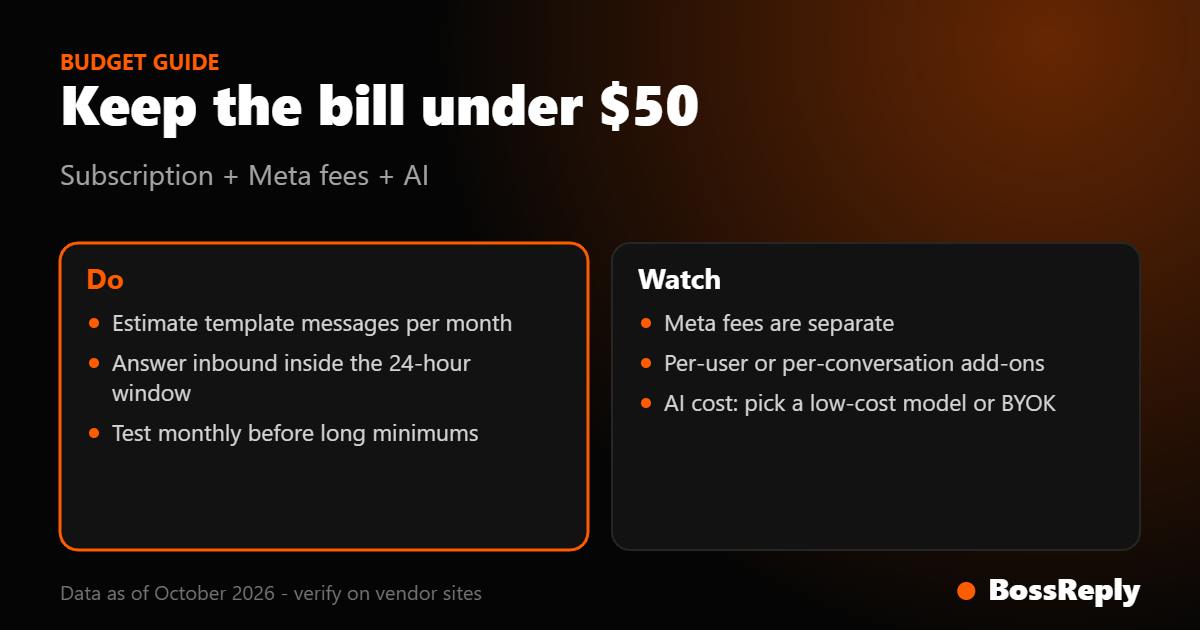
Estimate template messages: multiply customers by the number of marketing and utility templates you send per month.
Use the service window: reply to inbound questions promptly inside the 24-hour window instead of sending a new template.
Avoid long minimums: test monthly before you commit to 6 or 12 months.
Pick the right AI model: on a bring-your-own-key plan, a low-cost model can cost a fraction of a cent per reply.
Review monthly: check Meta's invoice and your platform's usage report.
What mistakes do small businesses make?
Picking the cheapest subscription and ignoring Meta's fees.
Sending marketing templates to customers who have not opted in.
Putting the main business number on an unofficial QR tool for mass broadcasts.
Signing a 12-month contract before testing real conversations.
Frequently asked questions
What is the best WhatsApp chatbot for a small business?
For under $50, BossReply, Chatfuel, Kommo and Tidio are the main options. BossReply is the lowest-cost choice with an AI agent and a QR or official API connection.
Is there a free WhatsApp chatbot?
Superchat has a free plan with 30 active contacts. The WhatsApp Business App is free but not designed for chatbots.
How much do WhatsApp messages cost?
Meta charges per delivered template message, with rates that depend on category and country. Check its pricing page.
Do I need the WhatsApp Business API?
For templates, automation and several agents, yes. A QR connection is quicker but outside the official platform.
Can a chatbot answer in Arabic or other languages?
AI chatbots can answer in many languages, but test your language with real questions before launch.
Do the prices change?
Yes. Confirm each price on the vendor's website.
Sources and method
We selected tools with a published entry plan near or under $50 and compared channels, AI and billing model. Official pages: bossreply.com/pricing, kommo.com/pricing, tidio.com/pricing, superchat.com/pricing, zoko.io/pricing and botpress.com/pricing. Chatfuel's figures come from a competitor-written review. Meta's fees come from developers.facebook.com/docs/whatsapp/pricing, and the October 2026 service-message change from vendor notices. Prices were read on October 16 and 17, 2026.
What should you ask before you buy?
Ask each vendor whether the plan includes the official WhatsApp API or only a QR connection, what the minimum term is, how AI usage is billed, and how you can export your contacts if you leave. Get the answers in writing, because pricing pages rarely cover them.
Conclusion
Under $50, pick the tool that fits how you want to grow: a flat AI inbox, a per-user CRM or a website-first chat. Budget Meta's fees separately and test on a real conversation first. Try BossReply or see the WhatsApp chatbot page.