25 Instagram DM Auto-Reply Templates for Coaches and Small Businesses
Short answer: The best Instagram DM auto-reply templates are short, name the sender, deliver what was promised in the first line and end with one easy question. Below are 25 copy-and-paste templates for comment triggers, first contact, FAQs, bookings, away messages and follow-ups, plus the Meta limits that decide how you can use them.
Last updated: October 17, 2026. Written by the BossReply Team. BossReply is our product and can send DMs like these; the templates work in any tool. They are illustrative examples, not tested results. Replace everything in [brackets] with your own details.
Key takeaways
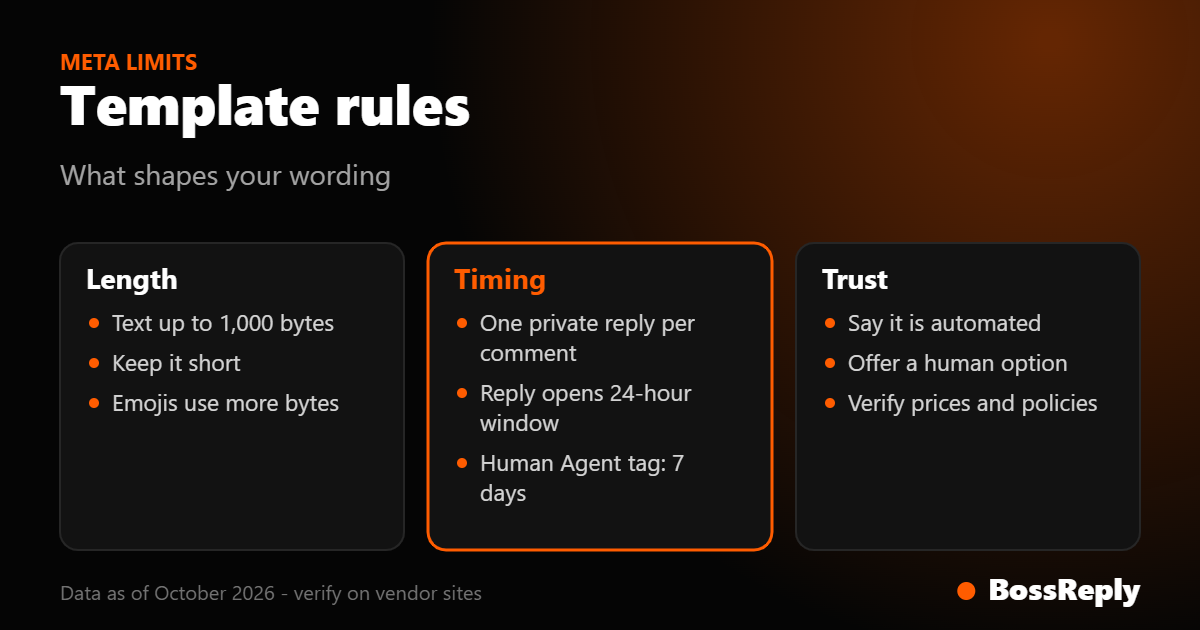
Meta allows one private reply per commenter, so your first template has to deliver the promise and ask one question.
A text message on Meta's Instagram Messaging API can be up to 1,000 bytes of UTF-8 text. Plain English fits easily; long Arabic, emoji-heavy or accented text can use more bytes per character.
Where the law requires it, automated chats must say they are automated. A one-line disclosure in your greeting covers this for most accounts, but check your own obligations.
Always keep a way out to a human in at least the follow-up templates.
What makes a good Instagram DM auto-reply?
A good auto-reply gives the person what they came for in the first sentence, sounds like a human wrote it and asks one question that is easy to answer. It does not paste a long pitch, hide the link or ask for three things at once.
Four habits make templates work better in practice: use the person's first name if your tool supports it, mention your brand so message-request recipients recognise you, keep it under about 300 characters, and put the link on its own line so it is easy to tap. These are editorial habits from how DMs read on a phone, not measured results.
What limits should you know before using templates?
The limits come from Meta, and they shape every template. We read these on Meta for Developers in October 2026.
Rule | What it means for your template |
|---|---|
One private reply per commenter | The comment-trigger template must stand alone |
7 days after the comment | Send quickly; old comments cannot be answered |
Reply opens a 24-hour window | Plan follow-ups to land within it |
Text up to 1,000 bytes | Keep templates short, especially non-English text |
Disclosure where law requires | Add an "automated assistant" line |
Which templates work for comment-to-DM?
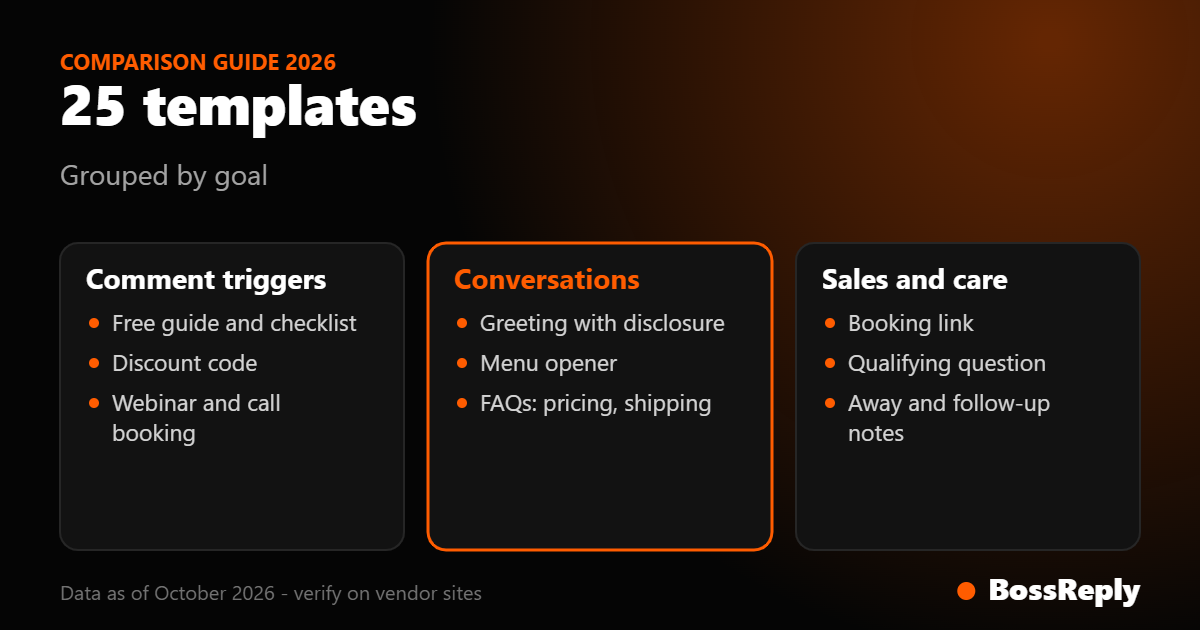
Comment-to-DM templates are sent after someone comments your keyword. Because Meta allows a single private reply, each one delivers the item and asks one question. Setup steps are in our comment-to-DM guide.
Free guide. "Hi [Name], it's [Brand]. Here is the [guide name] you asked for: [link]. What are you hoping to fix first?"
Checklist. "Thanks for commenting! Your [topic] checklist: [link]. Which step do you think you're missing?"
Discount code. "Here's your code: [CODE] for [X]% off [product], valid until [date]: [link]. Want help choosing?"
Price list. "Our current prices are here: [link]. Tell me what you need and I'll point you to the right option."
Webinar or live. "You're in! The [event] starts [date and time]. Join here: [link]. Is there a question you want covered?"
Free call. "Great to hear from you. Book a free [length]-minute call here: [link]. What would you like to talk about?"
Waitlist. "You're on the waitlist for [offer]. We'll message you when it opens. Is there anything you want to know in the meantime?"
See our list of comment keywords for the words to pair with these.
Which templates work as a first reply to a new message?
Use these when someone starts a conversation by direct message or story reply. The person has messaged first, so you are inside the 24-hour window and can be more conversational.
Greeting with disclosure. "Hi, thanks for messaging [Brand]! I'm the automated assistant and can help with [topics]. A person can step in anytime, just type HUMAN."
Menu opener. "Hi [Name]! What can I help with? Reply 1 for prices, 2 for bookings, 3 for support."
Product question. "Thanks for asking about [product]. It [one-line benefit]. Want the link, sizes or delivery info?"
Collab or business enquiry. "Thanks for reaching out about a partnership. Please send your name, company and what you have in mind, and our team will reply."
Story reply. "Glad you liked the story! Want the details? Here's the link: [link]." (More in our story reply guide.)
Which templates answer common questions?
FAQ templates answer the questions you get every week. In BossReply, an AI agent trained on your own content through a knowledge base can answer these in your wording, but a fixed template is a safe starting point in any tool.
Pricing. "Our prices start at [amount]. The full list is here: [link]. Tell me your goal and I'll suggest an option."
Opening hours. "We're open [days and hours] ([time zone]). Outside those hours I'll take your message and we'll reply the next working day."
Shipping. "We ship to [regions]. Delivery usually takes [days]. Track or check an order here: [link]."
Returns. "You can return items within [days] of delivery. Full policy: [link]. Need help starting a return?"
Location. "You'll find us at [address]. Map: [link]. Parking: [details]."
Always verify the numbers in these against your real policy before they go live. A wrong delivery time sent automatically costs more than no reply.
Which templates handle bookings and sales?
Sales templates move a warm lead to one clear next step: book, buy or talk to a person. Offer one action per message.
Booking link. "Happy to help you book. Pick a time here: [link]. If none work, tell me your preferred days."
Qualifying question. "To point you to the right plan, which best describes you: A) just starting, B) already have clients, C) agency?"
Lead handover. "Thanks, [Name]. I've passed your details to [team member], who will reply within [timeframe]."
The handover template pairs with a shared inbox. In BossReply, the conversation stays in one inbox with WhatsApp, Messenger, Telegram and website chat, so your team picks up where the bot stopped.
Which templates cover away messages and follow-ups?
Away and follow-up templates keep leads warm without sounding pushy. Meta's help pages describe Inbox automations such as an instant reply to a first message, an away message and keyword replies in Meta Business Suite; a search summary of Meta's help center says keyword automations there are desktop-only, match exactly and allow up to five keywords. We could not open the full Meta help page, so confirm those details yourself.
Away message. "Thanks for your message! We're away until [time]. We'll reply as soon as we're back. For urgent help: [link]."
Soft nudge, same day. "Still thinking it over? Happy to answer anything about [offer]."
Last reminder inside the window. "Quick reminder: your [item] link is here: [link]. Reply with a question anytime."
Thank you after purchase. "Thank you for ordering, [Name]! Your confirmation is on its way. Reply here if you need anything."
Opt-out acknowledgment. "No problem, I won't message you again about this. You can write to us anytime."
Follow-ups must stay inside the messaging window Meta sets. After 24 hours without a reply from the person, an automated message is not permitted, except for manual replies by a human using the Human Agent tag, which Meta's policy says allows up to 7 days. Do not use that tag for automated or promotional messages.
How do you customise templates so they do not feel robotic?
Add your own wording, vary the openers and use specifics. Swap "Hello valued customer" for how you actually talk, add a detail that only your brand would say and cut every sentence that does not help the reader act.
Three quick edits help most: replace generic thanks with the specific item they asked for, replace "please feel free to" with a direct invitation, and replace long paragraphs with two short lines. Test each template by sending it to yourself and reading it on a phone. Our guide for coaches shows how this looks in a coaching business.
Frequently asked questions
Can I use emojis in auto-replies?
Yes. Meta supports UTF-8 text, but each emoji uses several bytes against the 1,000-byte text limit, so use them sparingly.
How long can an Instagram DM template be?
Meta lists up to 1,000 bytes of UTF-8 text per text message. In plain English that is roughly 1,000 characters; other scripts and emojis use more bytes.
Do I need to say it is automated?
Where applicable law requires it, Meta says bots must disclose they are automated, and recommends it as good practice elsewhere. This is not legal advice.
Can the same template run after a comment and after a DM?
You can reuse the wording, but the comment version must stand alone because Meta allows one private reply before the person responds.
Should I put the link in the first message?
Yes, for a free resource, because that is what they commented for. Add a question afterwards so they have a reason to reply.
Will these work on personal accounts?
No. Meta's messaging API needs a professional account.
Sources and method
Read in October 2026. Templates are our own illustrative examples.
Instagram Messaging API: 1,000-byte UTF-8 text limit, 24-hour response window, professional account.
Private Replies: one reply, 7 days, reply opens the window.
Messenger Platform and Instagram Messaging API policy: disclosure, Human Agent tag up to 7 days, promotional content in the window.
Meta Business Help: Inbox Automations on desktop: only a search summary was available, so features there are unverified by us.
Conclusion
Start with three templates: a comment-trigger delivery, a greeting with a human option and an away message. Add the rest as you see which questions repeat. When you want one inbox for these replies and your team's handover, you can try BossReply at chat.bossreply.com.